
myCapitalInsurance5.6.1 - Google Play
You'll be able to see results in few seconds.
Publisher Description


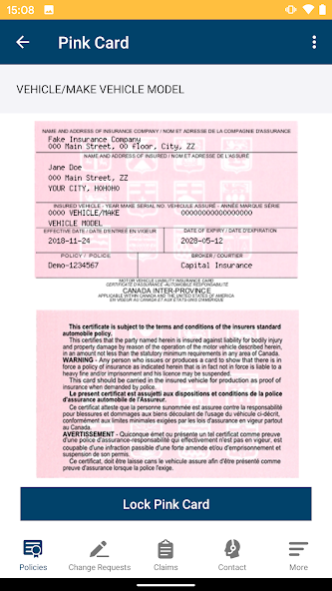

Capital Insurance App is an exclusive app that gives Capital Insurance clients access to all their insurance information at the touch of a button, including your insurance card. Access your vehicle information, deductibles, coverages right from your phone. In the event of an accident, collect and submit all the necessary information to help process your claim as fast as possible.
About myCapitalInsurance
The company that develops myCapitalInsurance is Trufla Technology. The latest version released by its developer is 5.6.1.
To install myCapitalInsurance on your Android device, just click the green Continue To App button above to start the installation process. The app is listed on our website since 2023-10-18 and was downloaded 0 times. We have already checked if the download link is safe, however for your own protection we recommend that you scan the downloaded app with your antivirus. Your antivirus may detect the myCapitalInsurance as malware as malware if the download link to ca.sharpmobile.myCapitalInsurance is broken.
How to install myCapitalInsurance on your Android device:
- Click on the Continue To App button on our website. This will redirect you to Google Play.
- Once the myCapitalInsurance is shown in the Google Play listing of your Android device, you can start its download and installation. Tap on the Install button located below the search bar and to the right of the app icon.
- A pop-up window with the permissions required by myCapitalInsurance will be shown. Click on Accept to continue the process.
- myCapitalInsurance will be downloaded onto your device, displaying a progress. Once the download completes, the installation will start and you'll get a notification after the installation is finished.
Program Details
System requirements
Download information
Pricing
Version History
version 5.6.1
posted on 2023-10-18
version 5.4.7
posted on 2023-08-30
Our latest update gives you more control over the security of your account and makes it easier to view and change your account information.
How? Profile Settings
Easily monitor your account activity by checking your login sessions and activity log. If you notice any suspicious activity, safeguard your account with just one click by signing out of all sessions.
version 5.4.3
posted on 2023-08-10
fixing bugs.
version 5.4.0
posted on 2023-07-16
Policy Notifications
Stay in the know with the new notifications feature. Receive push notifications for updates to your policies, including renewal, cancellation, and more, and view and download your documents in just a few clicks. Documents are in chronological order, and new documents are marked for convenience.
version 5.2.7
posted on 2023-03-05
- User can now cancel his delete account request.
- User can set his biometrics (face ID/ finger print) through the user profile.
- User can find the biometrics that matches him operating system.
- User is able to set both him biometrics along with the passcode.
- Fixing Bugs.
version 4.8.4
posted on 2022-02-13
Welcome to the all new myCapitalInsurance mobile app!
Completely redesigned to improve your experience and access your information quicker.
You can now:
. Login with fingerprint or passcode
. Share your digital pink card
. Access your policy documents
. Add photos for policy change requests
. Access to Claims and more info
. Lock your Pink Card screen
. TravelWell Policy's update
. Policy payment view updates (if applicable)
. Bug Fixes.
version 4.5.4
posted on 2021-09-30
- Fixed issue for Pink Slip to show correct name or address after a policy change
- Updated registration process
- Bug fixes and performance improvements
Disclaimer
Official Google Play Link
We do not host myCapitalInsurance on our servers. We did not scan it for viruses, adware, spyware or other type of malware. This app is hosted by Google and passed their terms and conditions to be listed there. We recommend caution when installing it.
The Google Play link for myCapitalInsurance is provided to you by apps112.com without any warranties, representations or guarantees of any kind, so access it at your own risk.
If you have questions regarding this particular app contact the publisher directly. For questions about the functionalities of apps112.com contact us.
